
Amazon's New 75-Character Title Rule: What Sellers Need to Do
Amazon isn't asking sellers to use fewer words. It's asking sellers to organize product information differently. For years, sellers packed titles with every keyword and feature they could fit, treating the title field as the only real estate that mattered for a shopper to find and understand a product. Amazon's new rule pushes in a different direction: cleaner, shorter titles, with additional product details moved into a new field called Item Highlights.
This guide focuses on what sellers should actually do about the change — not on speculation about what it might mean. The 75-character rule went into effect on July 27, 2026, and Amazon has already updated hundreds of millions of titles. On July 30, Amazon published a follow-up FAQ that answered several of the biggest open questions sellers had been asking — including a direct confirmation that search and discoverability are unchanged, and that Item name and Item Highlights are both search inputs with neither prioritized over the other.
If you haven't finished updating your catalog yet, you're not too late. Amazon's AI rewrites are rolling out gradually through the rest of 2026, listings stay active the entire time, and you can still edit titles and Item Highlights yourself. The goal here is a calm, practical understanding of the rule as it stands now, plus a repeatable process for finishing the work on your terms.
The Right Information in the Right Place
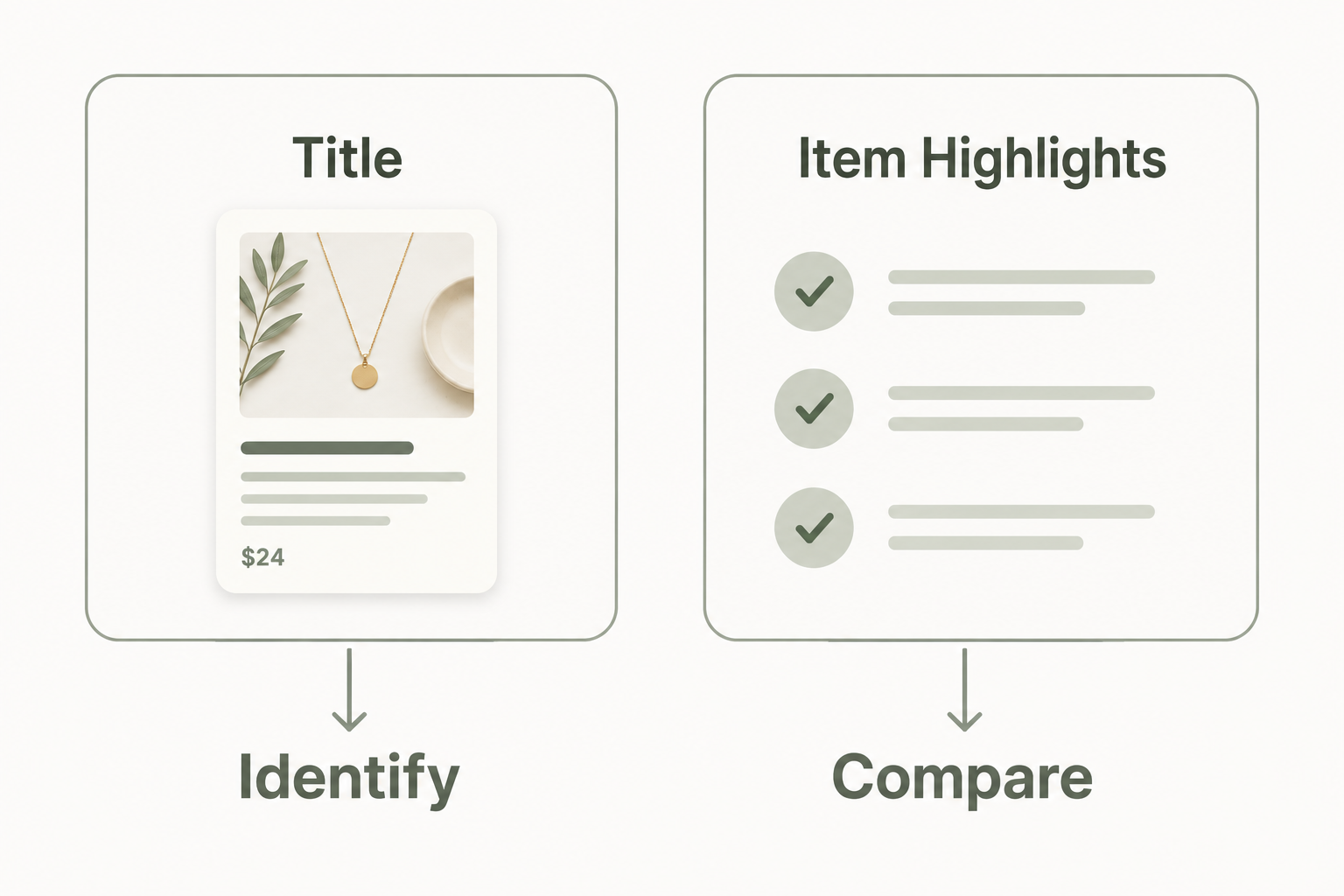
Everything in this guide comes back to one idea: the right information in the right place. A title's job is essential identification — what it is, and enough of a differentiator to matter. Item Highlights' job is supporting comparison — the details a shopper checks once they're already interested. Neither field is less important. Each simply has a clearer job.
What You'll Learn
- What officially changed, what already took effect on July 27, and who it applies to
- Amazon's own stated reasons for the change — and what it has not said
- The principles behind a compliant, effective title
- What Item Highlights is for, and how it's different from bullet points
- What Amazon's July 30 FAQ confirmed about search, ranking, and display
- A five-step process for rewriting titles across your catalog — including bulk tools
- Common mistakes sellers are making, and a full listing-update checklist
Chapter 1: What Changed
Amazon Update: As of July 27, 2026, Amazon enforces a 75-character limit on product titles across all categories except media (books, music, video, and similar), and across all marketplaces except Saudi Arabia, Egypt, Turkiye, and the UAE. New listings must comply. Amazon has reported that more than 984 million product titles have already been updated since the policy first rolled out in June.
Existing listings that were already over the limit were not force-truncated on the effective date — they remain active and visible as-is. Instead, Amazon's AI is gradually rewriting non-compliant titles for sellers who haven't updated them first. The rollout continues through the rest of 2026. Nothing disappears overnight, but titles you don't touch will eventually be rewritten by Amazon on Amazon's terms rather than yours.
Alongside the shorter title limit, Amazon introduced a new field: Item Highlights. It allows up to 125 characters of comma-separated phrases — not full sentences — and is designed to display directly below the product title. This is where supporting details that don't fit (or don't belong) in the title can now live. Starting August 10, 2026, Amazon says Item Highlights will appear beneath the Item name on both desktop and mobile with a consistent layout (the exact visible length still varies by screen size).
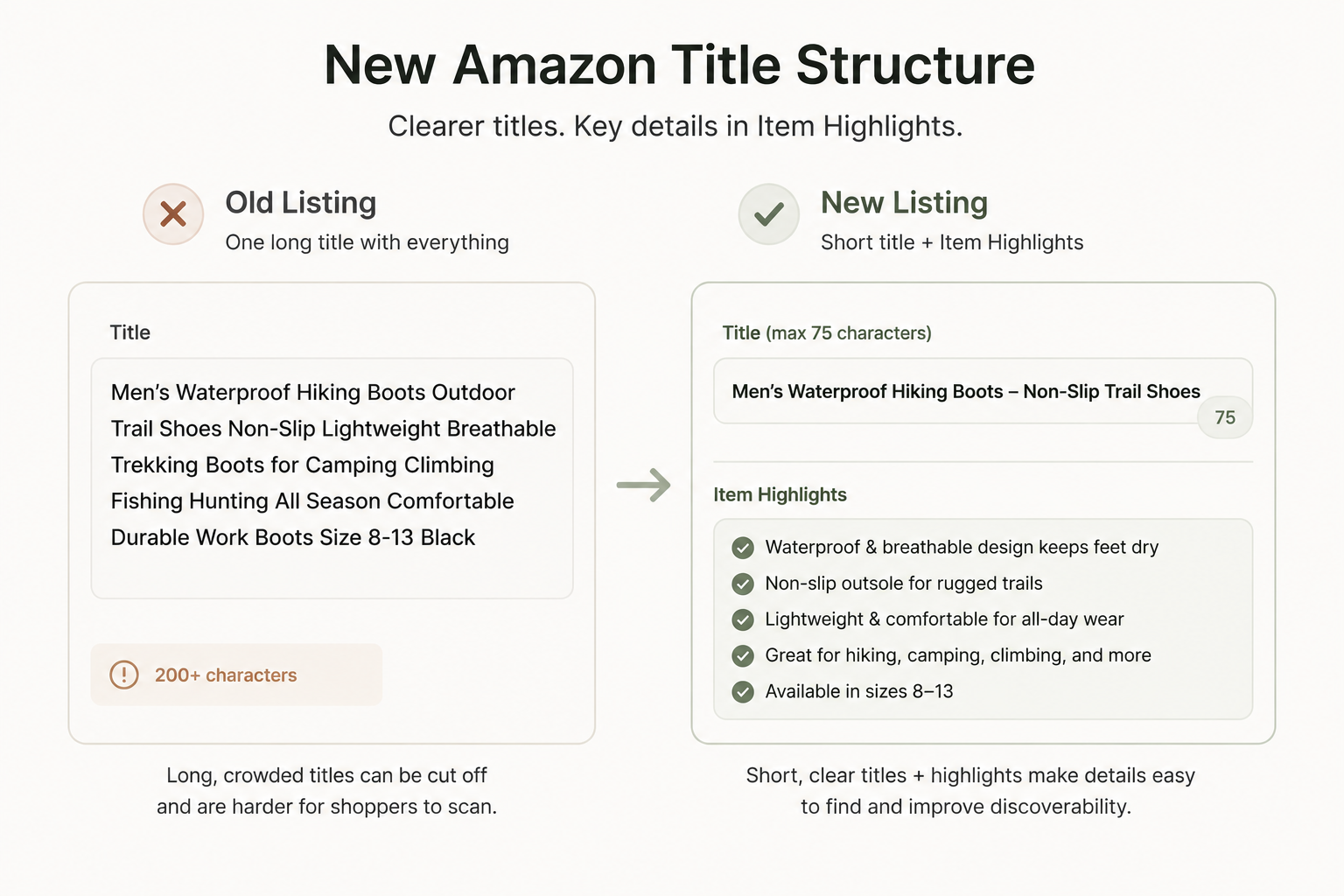
To help sellers make the transition, Amazon ships a named AI tool — referred to as "Enhance Listings" or "View enhancements" inside Manage All Inventory — that generates compliant title and Item Highlights suggestions. Sellers can still review and accept those suggestions, edit titles manually, or leave listings alone. For titles that remain non-compliant, Amazon applies its own rewrites automatically, but gradually.
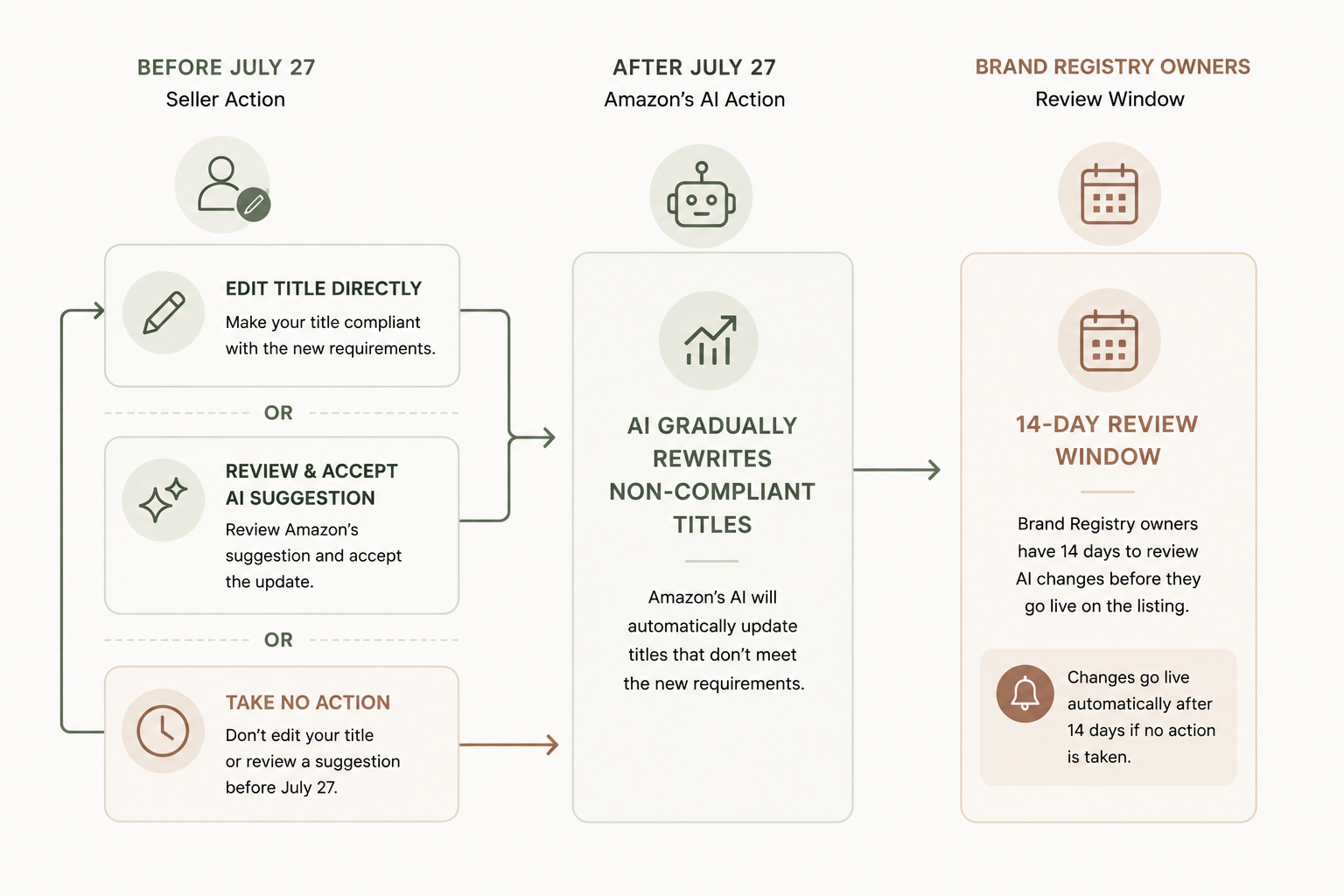
Brand Registry owners get an added protection: a 14-day review and approval window for any AI-generated changes to their titles before those changes go live, via Review Listing Changes. Non-Brand-Registered sellers do not get that same buffer — if you're not brand registered, treat every day past July 27 as a day your titles could already be getting rewritten without your input. Act early rather than assume you'll get a chance to review changes first.
Amazon has published its own before-and-after example to illustrate what a compliant update looks like:
- Before (92 characters): "Premium Stainless Steel Insulated Water Bottle – Keeps Drinks Cold 24 Hours, Hot 12 Hours, BPA-Free"
- After (62 characters): "Premium Stainless Steel Insulated Water Bottle – BPA-Free"
- Item Highlight (98 characters): "Keeps drinks cold 24 hours, hot 12 hours. Ideal for gym, office, and outdoor adventures."
Notice what happened: the performance claims (cold 24 hours, hot 12 hours) and the use-case detail (gym, office, outdoor adventures) simply moved to a field built to hold them.
Nothing was deleted. It was relocated.
That relocation, not deletion, is the core skill this guide will help you build.
Chapter 2: Why Amazon Made the Change
It's worth being precise and brief here, because this is exactly the kind of chapter where speculation tends to creep in disguised as explanation.
Amazon's own stated reasoning for the change comes down to two things: mobile display and readability (titles should fully display on mobile devices without awkward truncation), and consistency with character-limit norms used elsewhere in the industry across marketplaces. Shorter titles also make it easier for shoppers to quickly understand products on small screens — that's simply a description of the user experience a shorter title produces, not a separate claim Amazon has made about conversions or rankings.
That's the complete list of what Amazon has said. Amazon has not stated that this change is intended to affect the ranking algorithm, adjust search-relevance mechanics, or specifically target keyword stuffing as a policy goal. You may see articles or forum posts claiming Amazon shortened titles "to fight keyword stuffing" or "to change how ranking works." That's an industry inference — a reasonable guess, perhaps, but not something Amazon has said. We'll draw this line sharply throughout the guide, and especially in Chapter 5.
A short chapter here is intentional. Padding Amazon's two stated reasons with unstated ones would blur exactly the distinction this guide exists to protect. It's tempting, when a marketplace makes a visible change, to look for a hidden strategic motive underneath it. Sometimes there is one. In this case, Amazon simply hasn't shared one beyond readability and consistency — and treating a guess as a confirmed motive would undermine the very discipline this guide is built around.
Chapter 3: What Belongs in a Title
Rather than treating the 75-character limit as a countdown timer to race against, it helps to think in terms of principles. A well-built title under the new rule follows the same logic as a well-built title always should have — it just has less room for excess.
The 3-Part Amazon Title Formula
Every compliant title, at its core, is answering three questions — the "essential identification" half of the Right Information in the Right Place principle from the introduction:
- What is it?
- What's the most important differentiator?
- Who is it for? (when relevant)
Everything else — materials, use cases, secondary features, compatibility — belongs in Item Highlights, covered in the next chapter. If a phrase in your title doesn't answer one of these three questions, it's a strong candidate to move.
Amazon's official style rules for titles include:
- No promotional language: phrases like "free shipping" or "100% quality guaranteed" are not allowed in the title.
- Restricted special characters: characters such as !, $, ?, _, {, and } are banned outright. Others, like ~, #, <, >, and *, are allowed only in specific contexts — such as measurements or model identifiers — never as decoration.
- No word repeated more than twice: this applies to brand names too. Prepositions, articles, and conjunctions (like "and," "for," "the") are exempt from the repetition count.
- Title Case formatting: not ALL CAPS, not all lowercase.
- Numerals, not spelled-out numbers: use "2" instead of "Two."
- A recommended element order: brand, style or flavor, product type, key attribute, color, size or pack count, and model number, generally in that sequence.
- Parent/child ASIN rules: parent-level titles should exclude size and color; only child-level ASIN titles should include those variant-specific details.
🦉 Quick Win: The parent/child ASIN rule is narrow, but it's an easy one to overlook if you're batch-editing titles quickly. Check your parent listings specifically for stray size or color mentions that belong only on the child ASINs — this is a fast fix with an outsized cleanup effect.
Amazon has published its own compliant and non-compliant examples for each of these rules, which are worth studying directly:
- Redundancy — Non-compliant: "Levi's Men's Jeans Men's 501 Original Fit Men's Denim Jeans"
Redundancy — Compliant: "Levi's Men's 501 Original Fit Jeans" - Special characters — Non-compliant: "Brother Printer★HL-L2350DW★Wireless Monochrome★BEST SELLER★"
Special characters — Compliant: "Brother Printer, HL-L2350DW Wireless Monochrome" - Word order — Non-compliant: "Medium Roast Decaf Coffee 12oz Pack of 3 Colombia Whole Bean Amazon Fresh"
Word order — Compliant: "Amazon Fresh Decaf Colombia Whole Bean Coffee, Medium Roast, 12 Ounce" - Numbers — Non-compliant: "Two-Pack Cotton Towels, Twenty-Four x Forty-Eight inches"
Numbers — Compliant: "2-Pack Cotton Towels, 24 x 48 inches"
If you've read our guide on How to Write Product Listings That Actually Sell (linked in this guide's related resources), this next point will sound familiar. That guide teaches that a title's whole job is answering two buyer questions fast: What is it? and Is it for me? Amazon's own stated goal for this update — mobile readability, fast comprehension — is functionally the same principle. The 75-character cap doesn't introduce a new idea; it just makes prioritizing those two questions non-optional. There's no more room to answer a third or fourth question in the title. That's what Item Highlights is for, which we'll cover next.
🦉 Sage Tip: Before you shorten a single title, ask "what is it, and is it for me?" of every word you're tempted to keep. If a word doesn't help answer one of those two questions, it's a strong candidate to move to Item Highlights rather than fight to preserve in the title.
Chapter 4: What Belongs in Item Highlights
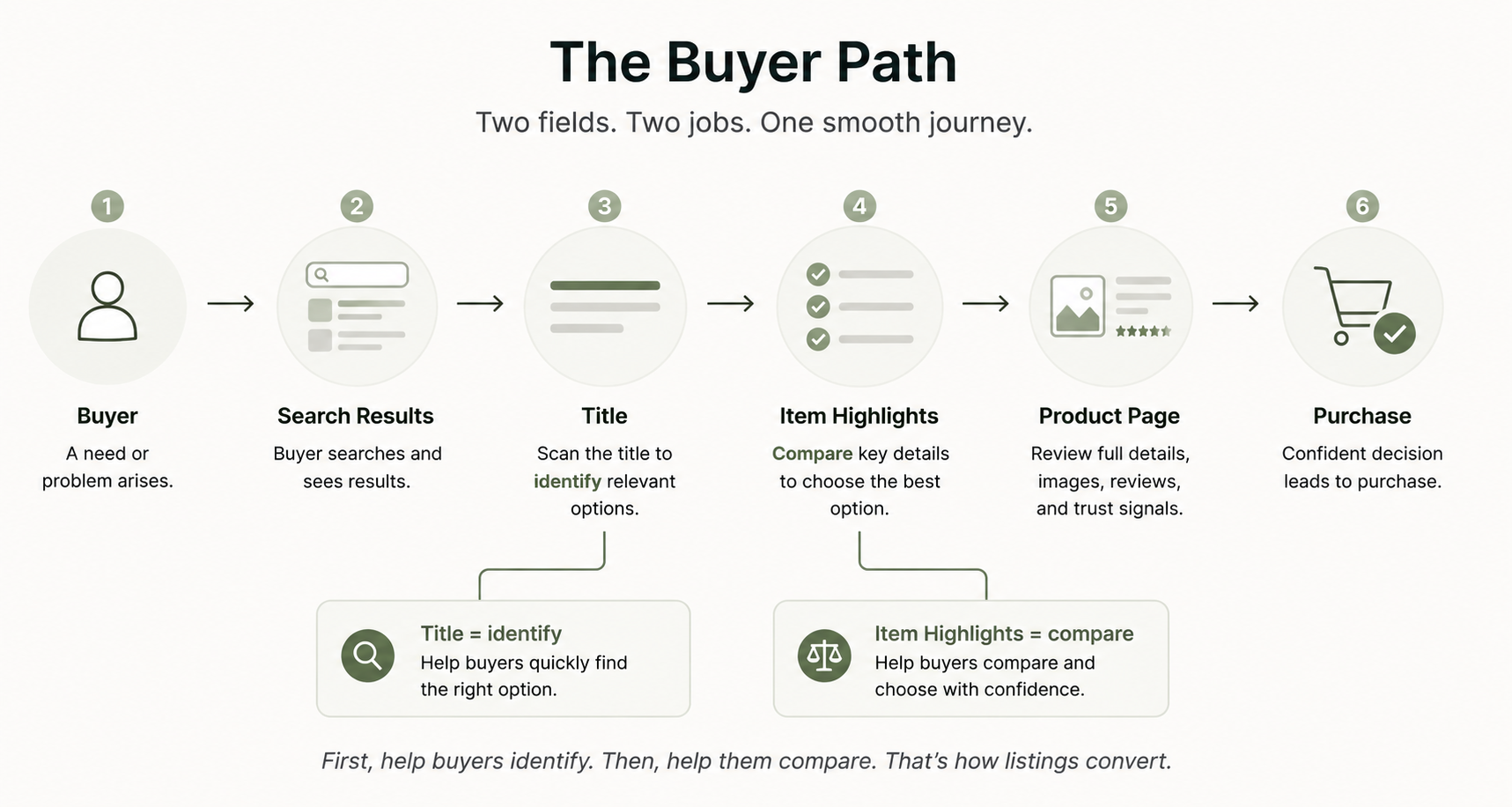
Item Highlights is a new 125-character field made up of comma-separated phrases rather than full sentences. It displays directly below the product title on the product detail page. Per Amazon's own framing, it's meant to hold "materials or recommended use cases that help customers compare options" — the kind of detail that's genuinely useful for a buyer but doesn't need to occupy scarce title space.
Amazon's own FAQ includes a clear example of this in action. A title that used to read:
"Fast Charger Adapter, PPS Supported, Compact Charger for models like MacBook Air/Macbook Pro/iPhone 14/iPhone 13/Galaxy S22/iPad Pro/Pixel and More, Cable Not Included"
...gets shortened, with the compatibility and inclusion details relocated into Item Highlights: "USB-C, PPS Support, Cable not included."
The same relocation principle applies no matter what you sell. A few quick examples across different categories, in the same illustrative spirit as Amazon's own:
- Clothing — Before: "Women's Soft Cotton V-Neck T-Shirt Casual Summer Basic Tee Short Sleeve Loose Fit for Women Everyday Wear"
After (title): "Women's Cotton V-Neck T-Shirt, Short Sleeve"
Item Highlight: "Loose fit, casual, breathable cotton, everyday summer wear" - Pet product — Before: "Durable Chew-Resistant Dog Rope Toy for Aggressive Chewers Large Dogs Medium Dogs Puppies Tug of War Interactive Play Teeth Cleaning"
After (title): "Chew-Resistant Rope Dog Toy, Large Dogs"
Item Highlight: "Tug-of-war, interactive play, helps clean teeth, for aggressive chewers" - Electronics — Before: "Wireless Bluetooth Earbuds with Noise Cancelling Long Battery Life 30 Hours Playtime Touch Control Waterproof for Running Gym Travel"
After (title): "Wireless Earbuds with Noise Cancellation, 30-Hour Battery"
Item Highlight: "Touch control, waterproof, ideal for running, gym, and travel" - Home decor — Before: "Modern Farmhouse Wall Art Canvas Print Framed Ready to Hang Living Room Bedroom Kitchen Decor Rustic Style Large Size"
After (title): "Framed Farmhouse Wall Art Canvas Print, Large"
Item Highlight: "Ready to hang, rustic style, fits living room, bedroom, or kitchen" - Beauty — Before: "Hydrating Vitamin C Face Serum for Brightening Anti-Aging Fine Lines Dark Spots All Skin Types Cruelty Free Vegan 1oz Bottle"
After (title): "Vitamin C Face Serum, Brightening, 1oz"
Item Highlight: "For fine lines and dark spots, all skin types, cruelty-free, vegan"
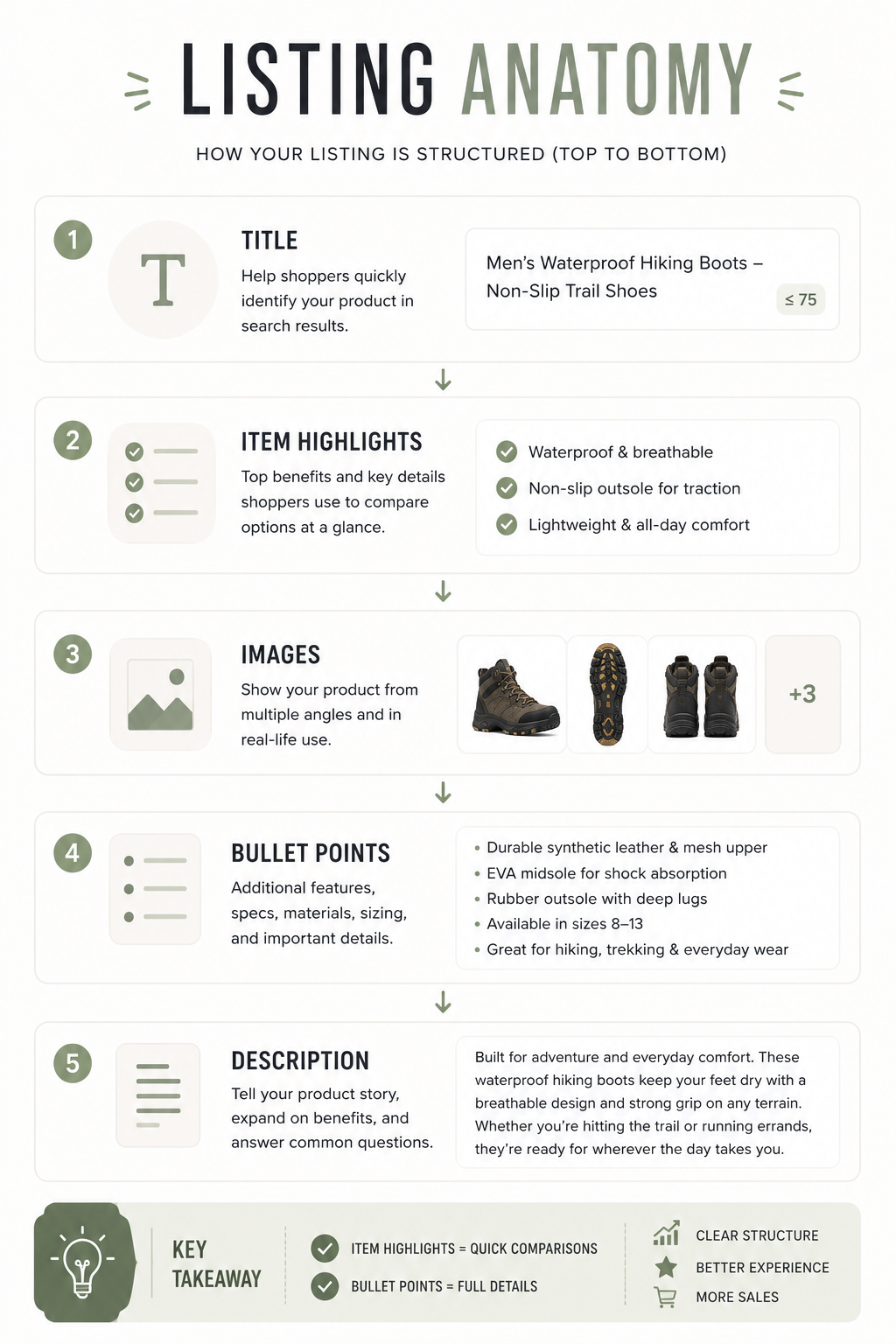
It's easy to assume Item Highlights is just a shorter version of your bullet points, but it's a distinct field with a distinct position and a distinct format: it sits directly under the title (not further down the page), it's capped at 125 characters total (not per bullet), and it uses short comma-separated phrases rather than full sentences.
Officially Confirmed (July 30 FAQ): Item Highlights content is searchable and appears in both search results and on the product detail page. Amazon also confirmed that Item name and Item Highlights are both inputs for search, with neither prioritized over the other — and that search and discoverability are unchanged by this update.
That confirmation matters more than most of the pre-rollout speculation did. A lot of early guidance assumed the title carried most of the ranking weight, which pushed sellers to cram every high-value keyword into the first 75 characters and treat Item Highlights as an afterthought. Amazon's own FAQ contradicts that assumption. If a secondary keyword doesn't fit naturally in the title, Item Highlights is a legitimate home for it — not a consolation prize.
The practical takeaway is still disciplined writing, not keyword dumping. Item Highlights complements the title. It doesn't replace it, and it shouldn't become a second stuffed title. Think of the two fields as working together: the title carries essential identification, while Item Highlights carries the supporting context a comparison-shopping buyer might scan for next — compatibility, materials, or intended use — without forcing that context to compete for limited title space. Both fields feed search; only the title has to do the identity job in 75 characters.
One more practical note: because Item Highlights uses comma-separated phrases rather than sentences, it rewards the same discipline as good backend search terms — concise, specific, non-redundant phrases rather than marketing copy. Avoid writing a mini-sentence with connecting words; instead, treat each comma-separated segment as its own small, scannable fact.
Chapter 5: How This Changes Amazon SEO — Confirmed vs. Still Open
This is the chapter where this guide earns its usefulness. Pre-rollout speculation filled seller forums for weeks. Amazon's July 30 FAQ closed several of the biggest gaps. Here's the current split between what Amazon has actually confirmed and what remains open.
✅ Confirmed
- The 75-character title cap took effect July 27, 2026, across all categories except media and all marketplaces except Saudi Arabia, Egypt, Turkiye, and the UAE. Amazon reports more than 984 million titles already updated since the June rollout.
- Item Highlights is searchable and can appear in search results and on the product detail page.
- Search and discoverability are unchanged. Amazon's FAQ states that Item name and Item Highlights are both inputs for search, with neither prioritized over the other.
- Amazon's stated reasoning for the change: mobile display and readability, and cross-marketplace consistency — and nothing more than that.
- Gradual AI rewriting of non-compliant titles is underway for sellers who haven't updated their own titles first, continuing through the rest of 2026.
- Brand Registry owners get a 14-day review window to approve, modify, or reject AI-generated changes before they go live. Non-brand-registered sellers do not get that buffer.
- Starting August 10, 2026, Item Highlights display beneath the Item name on both desktop and mobile with a consistent layout (visible length still varies by screen size).
- Bulk updates are supported via the Category Listings report (now including an Item Highlights column) and the List Your Products tool; Amazon says spreadsheet uploads typically apply within about eight hours.
❓ Still Open / Not Confirmed
- Any specific ranking-algorithm motivation or keyword-stuffing-reduction goal. Amazon has not stated this as a reason for the change — see Chapter 2. Confirming that search inputs are unchanged is not the same as confirming a motive.
- The exact data sources or logic behind the AI tool's title suggestions.
- How visible Item Highlights will be on every device size after the August 10 layout change — Amazon notes visible length still varies by screen.
Why does the equal-search-input confirmation matter practically? Because it changes how hard you should fight to keep every keyword in the title. You no longer need to sacrifice readability to cram a secondary term into 75 characters. Lead with brand, primary keyword, and the one or two attributes shoppers search most. Move supporting detail — materials, use cases, secondary compatibility — into Item Highlights, where Amazon says it still counts for search.
The practical rule of thumb still favors a strong title: keep essential identification and your highest-priority differentiators in the title itself. Use Item Highlights for supporting comparison detail rather than as a dumping ground. Both fields feed search; only the title has to do the identity job cleanly in 75 characters.
You may still come across claims in seller forums or trade press about "winners and losers" emerging from this change, or warnings that AI-generated rewrites will "erode keyword equity" built up over time. Treat those as seller and press observation — not Amazon fact. What Amazon has confirmed is that discoverability mechanics are unchanged and that both fields feed search. Individual listing outcomes still depend on how well you rewrite.
Chapter 6: A Repeatable Rewrite Process
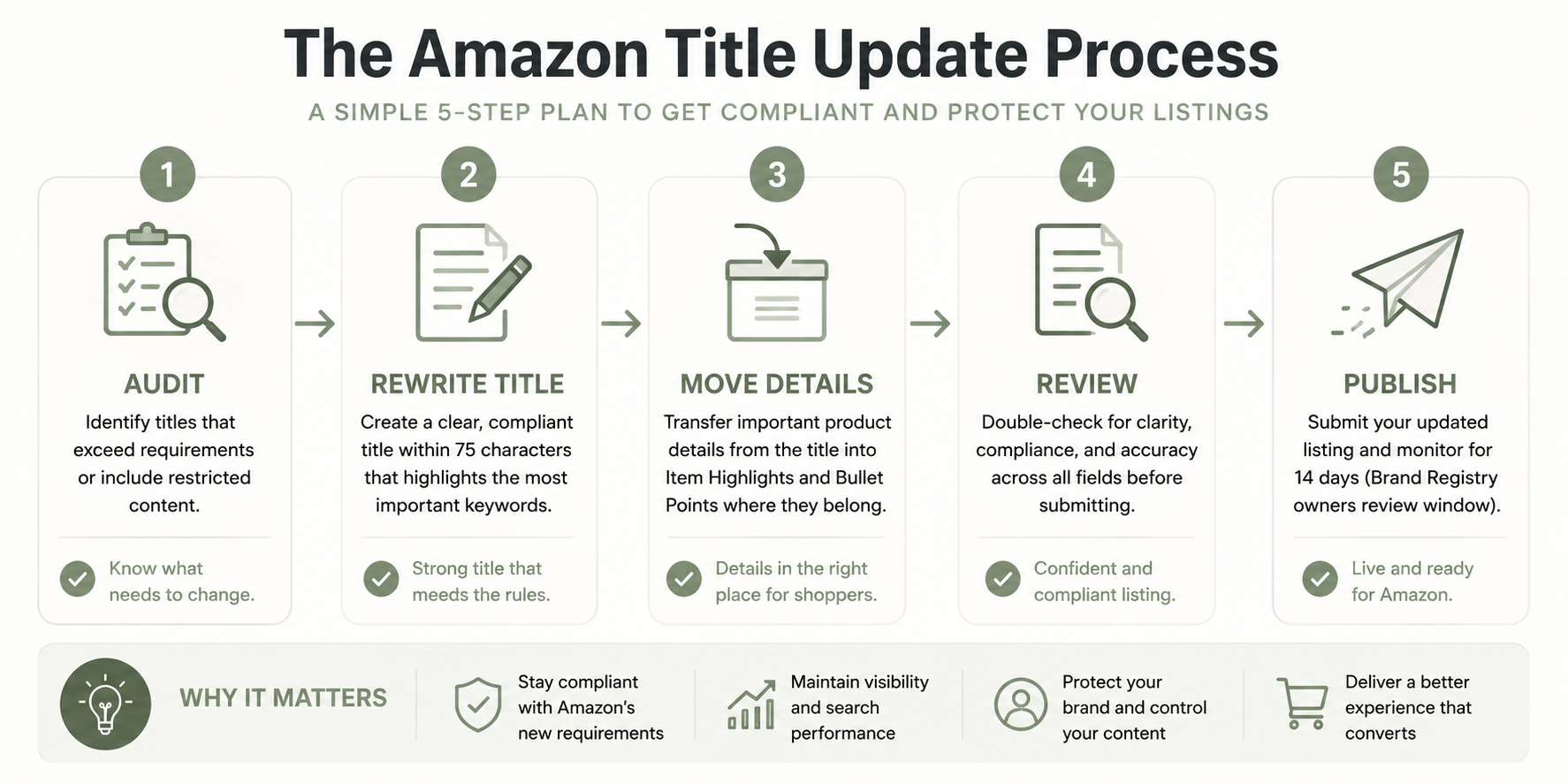
Rather than rewriting titles one at a time as inspiration strikes, it helps to run a consistent process across your catalog. Here's a five-step version specific enough that someone new to this could execute it without additional research.
- Audit. Pull a list of every active title over 75 characters. Most seller platforms let you export title length alongside SKU, so you can sort and prioritize rather than guess at which listings need attention.
- Remove repetition. Cut duplicate words and phrases from the title. Remember that articles, prepositions, and conjunctions ("and," "for," "the," "with") are exempt from the no-more-than-twice repetition rule, but everything else — including your own brand name — counts.
- Move supporting details to Item Highlights. Separate what's essential (keep in the title: what it is, who it's for, the identifying attribute that matters most) from what's supporting (materials, use cases, compatibility, secondary features — move these to Item Highlights as comma-separated phrases).
- Review for readability. Read the new title aloud. Would a person actually write it this way, or does it still read like a string of stitched-together keywords? If it doesn't sound natural, it's not finished.
- Check mobile appearance. Confirm the title doesn't get awkwardly cut off in a mobile search result preview. A title that's technically under 75 characters can still look clipped depending on where the natural break falls.
🦉 Quick Win: The mobile-check step is fast, easy, and the one sellers skip most often because it feels optional. Pull up your listing on a phone after every rewrite — it takes seconds and catches issues a desktop view won't show you.
If you're managing more than a handful of listings, one-at-a-time edits in Manage All Inventory aren't realistic. Amazon's practical bulk path is the Category Listings report, which now includes an Item Highlights column next to Item name. Edit both fields in the spreadsheet, upload through the List Your Products tool, and Amazon says updates typically apply within about eight hours — fast enough to audit a batch, catch a mistake, and re-upload a correction the same day.
Brand Registry owners should also check Review Listing Changes regularly. AI recommendations may already be queued, and letting the 14-day window lapse without reviewing them means accepting whatever the AI decided.
Chapter 7: Common Mistakes to Avoid
A number of assumptions are circulating in the seller community right now, some accurate and some not. Here's a myth-versus-reality rundown of the most common ones.
- Mistake: Keeping old keyword-stuffing habits, just in a shorter space.
Reality: The goal is a naturally readable title, not a denser version of the same crowded approach. - Mistake: Repeating the same keywords across the title and Item Highlights unnecessarily.
Reality: Use Item Highlights for details that aren't already in the title, not as an echo of it. - Mistake: Using marketing adjectives or subjective commentary ("amazing," "best-in-class") to fill space.
Reality: These don't answer "what is it" or "is it for me," and promotional language is against the rules to begin with. - Mistake: Ignoring Item Highlights entirely and leaving it blank.
Reality: It's confirmed searchable space you're otherwise leaving unused.
Common Mistake: Trying to cram content into exactly 75 characters instead of writing naturally. A title that hits the character limit but reads like a run-on keyword string fails the readability goal the rule was built around. Aim for clarity first; the character count is a ceiling, not a target to fill.
- Mistake: Waiting for Amazon's AI to finish the job for you.
Reality: The rollout is gradual through the rest of 2026, so there's no need to panic-rewrite your whole catalog overnight — but every day you wait is a day Amazon may rewrite a title without your input. Acting first means you control the wording.
Common Mistake: Still treating Item Highlights as a second-class field after Amazon's FAQ. Amazon confirmed Item name and Item Highlights are both search inputs with neither prioritized over the other. That does not mean you should dump keywords into Highlights carelessly — it means you no longer need to wreck title readability to protect every secondary term.
- Mistake: Trusting outdated category style-guide PDFs that still show old character limits (some show 150 characters).
Reality: These are outdated. Reference Amazon's current official Help page for the live limit rather than a saved document. - Mistake: Assuming AI-rewritten titles are automatically as good as a human rewrite.
Reality: Some press and seller commentary has raised concerns about generic or low-context results from automated rewrites. This should be treated as an observation, not a confirmed defect rate — but it's a reasonable argument for reviewing AI suggestions rather than accepting them blindly.
Chapter 8: Should You Let Amazon Rewrite Your Titles?
This is a genuinely practical question a lot of sellers are still asking, and the honest answer depends on how many listings you're managing — and whether you're brand registered.
Pros of letting Amazon's AI tool rewrite your titles:
- Saves time, especially across a large catalog
- Ensures technical compliance with the 75-character limit and formatting rules
Cons of letting Amazon's AI tool rewrite your titles:
- The AI doesn't know your brand positioning or what actually differentiates your product from a competitor's
- Generic wording is a real risk — press and seller commentary (see Chapter 7) has flagged this as a concern, not a confirmed defect rate
- Less control over exactly how your product is presented
- May remove or de-prioritize a differentiator that matters more to your specific buyers than Amazon's AI can know
A reasonable rule of thumb: if you have a handful of products, rewrite them yourself using the 3-Part Amazon Title Formula from Chapter 3 — it won't take long, and you keep full control. If you have hundreds of listings, use the Category Listings report for bulk edits and Amazon's AI suggestions as a starting point, but review each one rather than accepting them automatically — especially for your best-selling or most differentiated products. Brand Registry owners should monitor the 14-day Review Listing Changes window so queued AI rewrites don't go live unreviewed.
Chapter 9: Your Amazon Listing Update Checklist
Use this checklist to work through your catalog systematically.
Titles
- Exported a list of all titles over 75 characters
- Removed duplicate words and phrases (beyond the twice-max rule)
- Removed banned special characters and promotional language
- Confirmed Title Case formatting throughout
- Confirmed numerals are used instead of spelled-out numbers
- Checked element order (brand, style/flavor, product type, attribute, color, size/pack, model number)
- Confirmed parent ASINs exclude size/color details
- Read each new title aloud for natural readability
- Previewed each new title on a mobile screen
Item Highlights
- Identified supporting details moved out of the title
- Written as comma-separated phrases, not full sentences
- Confirmed content stays within 125 characters
- Avoided simply repeating title keywords
Images
- Confirmed main image still meets current Amazon image requirements
- Checked that no image text conflicts with the new title wording
Bullets
- Confirmed bullet points remain distinct in content from Item Highlights
- Reviewed bullets for consistency with the shortened title
Backend Keywords
- Moved any keywords cut from the title into backend search terms where relevant
- Removed duplicate terms already present in title or Item Highlights
Compliance & Operations
- Confirmed the marketplace is subject to the rule (excludes Saudi Arabia, Egypt, Turkiye, UAE)
- Confirmed the category is subject to the rule (excludes media)
- Reviewed AI-generated suggestions before accepting, where offered
- Brand Registry owners: checked Review Listing Changes and are monitoring the 14-day window
- For larger catalogs: used the Category Listings report (with Item Highlights column) and List Your Products bulk upload where practical
- Confirmed Item Highlights will display cleanly under the title on mobile and desktop after the August 10 layout consistency update
Frequently Asked Questions
- Do I have to rewrite every listing? Only listings over 75 characters need changes; compliant titles don't require any action.
- Did rankings change? Amazon's July 30 FAQ says search and discoverability are unchanged. Item name and Item Highlights are both search inputs, with neither prioritized over the other.
- Are Item Highlights indexed and searchable? Yes — officially confirmed, and confirmed as equal search inputs alongside the title.
- Can Amazon rewrite my titles? Yes. Gradual AI rewrites of non-compliant titles began after July 27 and continue through the rest of 2026.
- Should I remove keywords? No — relocate less-essential keywords to Item Highlights rather than deleting them outright.
- Does this affect every category and marketplace? No — media categories are excluded, as are four marketplaces: Saudi Arabia, Egypt, Turkiye, and the UAE.
- How is this different from bullet points? Item Highlights is a distinct field that appears directly below the title, capped at 125 characters, written as comma-separated phrases rather than full sentences.
- When do Item Highlights display consistently on desktop and mobile? Amazon says starting August 10, 2026, with the same layout on both (visible length still varies by screen size).
- What's the fastest way to update a large catalog? Use the Category Listings report (now includes Item Highlights) and upload via List Your Products; Amazon says changes typically apply within about eight hours.
Conclusion
This update isn't about using fewer keywords — it's about putting the right information in the right place. Amazon has moved toward cleaner, more readable listings that help buyers decide faster, and the sellers who benefit most are the ones who treat the title and Item Highlights as two distinct tools rather than one shrinking one.
Sellers who finish the work on their own terms won't necessarily write more — they'll write more intentionally, putting the most differentiating information in the title and the supporting detail where it now belongs, knowing both fields feed search.
Amazon's requirements change over time, and manually updating titles across dozens or hundreds of products can quickly become a time-consuming project. Marketplace rules change constantly, and sellers shouldn't have to spend hours researching every update. That's exactly the work ListSage is built to eliminate, generating ready-to-post Amazon listings that follow current platform requirements.
.png)
Lindsey Records
Founder of ListSage and a content strategist with 15+ years of experience in SEO, ecommerce, and AI. After growing her own Etsy and Shopify stores, she built ListSage to eliminate the hours of research, prompting, and rewriting required to create high-performing product listings.
.png)